Agile teams move fast. Sprints are short, requirements shift, and developers need to align on logic before writing a single line of code. That's where flowchart coding standards come in. When your team shares a consistent way to map out logic visually, you cut down on misunderstandings, reduce rework, and make code reviews far smoother. Without these standards, each developer draws their own version of a process different symbols, different levels of detail, different assumptions and nobody can compare or build on each other's work.
Flowchart coding standards for agile teams aren't about bureaucracy. They're about creating a shared visual language that keeps everyone on the same page, sprint after sprint.
What exactly are flowchart coding standards?
Flowchart coding standards are agreed-upon rules for how your team creates, structures, and uses flowcharts to represent program logic, workflows, and decision trees. They cover things like:
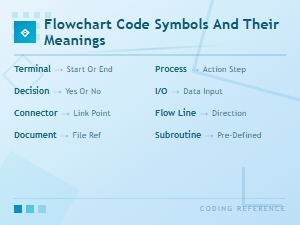
- Which symbols to use and what they mean (rectangles for processes, diamonds for decisions, ovals for start/end points)
- How detailed each flowchart should be at different stages of planning
- Naming conventions for variables, conditions, and outcomes inside the chart
- How flowcharts connect to user stories, acceptance criteria, and actual code
- Where flowcharts live in your project tools and who owns them
Think of it as a style guide, but for your team's visual logic diagrams. Just as you'd agree on indentation or naming conventions in code, flowchart standards ensure everyone diagrams the same way. If you're new to how these diagrams work in a development context, our guide on how flowchart codes work in software engineering covers the fundamentals.
Why should agile teams care about flowchart consistency?
Agile methods thrive on shared understanding. Daily standups, sprint planning, retrospectives they all depend on team members seeing the same picture. Flowcharts are one of the fastest ways to communicate logic, but only when everyone reads them the same way.
Here's what happens without standards:
- Developer A draws a detailed flowchart with swimlanes and data flow arrows
- Developer B sketches a quick decision tree on a whiteboard with no labels
- The QA engineer can't trace test paths in either diagram
- The product owner asks "what does this box mean?" in every review
Standardized flowcharts solve this. When your team agrees on structure, anyone can pick up a diagram and understand the logic whether they wrote it or not. This matters even more when your team is distributed across time zones.
When does a team actually need flowchart standards?
Not every small team needs a formal standard on day one. But certain situations make them necessary:
- Your team has grown past five or six developers and handoffs happen frequently
- You're working on complex business logic with multiple decision branches
- New team members struggle to understand existing code because there's no visual documentation
- Code reviews keep uncovering logic errors that a flowchart would have caught earlier
- You're building database-driven systems where data flow matters our article on flowchart codes for database architecture explains how standards help map data relationships
- Your team works on process-heavy applications like workflow automation or business rules engines
If two or more of these apply to your team, it's time to set some ground rules.
What should a flowchart coding standard include?
Symbol rules
Agree on a fixed set of symbols and stick to them. The ISO 5807 standard defines common flowchart symbols, and most teams don't need to reinvent the wheel. At minimum, define what your team uses for:
- Start and end points (typically ovals or rounded rectangles)
- Process steps (rectangles)
- Decision points (diamonds with yes/no or true/false branches)
- Input/output (parallelograms)
- Connectors (for linking across pages or sub-processes)
Don't allow team members to invent new symbol meanings on the fly. If someone needs to represent something unusual, discuss it as a team and update the standard.
Naming and labeling conventions
Every process box should have a clear, action-oriented label. "Validate user input" is better than "validation." Decision diamonds should state the condition explicitly: "Is email format valid?" rather than just "email?"
For variable names and conditions inside the chart, use the same naming conventions your team follows in code. This makes it easier to trace a flowchart path to the actual implementation.
Level of detail by stage
Not every flowchart needs to show every line of logic. Define what's expected at each stage:
- Sprint planning: High-level flowchart showing main paths and decision points enough to estimate and discuss approach
- During development: Detailed flowchart with all branches, error handling, and edge cases
- For documentation: Final, reviewed flowchart that matches the implemented code
Tool and format agreements
Pick one or two tools and standardize on them. Common choices include Lucidchart, draw.io, Miro, or even ASCII-based tools for developers who prefer plain text. The key is that everyone uses the same tool so diagrams are editable by any team member, not locked in one person's desktop app.
Store flowcharts where the team can find them linked to the relevant user story, pull request, or wiki page. A flowchart nobody can access is as good as no flowchart.
How do flowchart standards fit into agile ceremonies?
Flowchart coding standards aren't a separate process. They plug into what your team already does:
- Sprint planning: The developer taking a story sketches a flowchart during or right after planning. The team reviews it for completeness before coding starts.
- Daily standups: If a flowchart needs updating because requirements changed, the developer flags it just like flagging a blocked task.
- Code reviews: Reviewers compare the submitted code against the approved flowchart. If the code diverges from the flowchart, either the code or the diagram needs to change.
- Retrospectives: If flowcharts caused confusion or were missing, add it to the retro discussion. Standards should evolve based on what the team learns.
Teams that use flowcharts for business process mapping often find this integration especially valuable, since their diagrams serve double duty for both technical and business stakeholders.
What mistakes do teams make with flowchart standards?
Over-engineering the standard. A 20-page flowchart style guide nobody reads is worse than no guide. Start with one page covering symbols, naming, and storage location. Add rules only when confusion actually occurs.
Treating flowcharts as a one-time artifact. A flowchart drawn during sprint planning and never updated becomes misleading fast. If the code changes, the flowchart should change too. Make updating part of your definition of done.
Too much detail too early. Drawing every edge case before the team has even agreed on the approach wastes time. Start broad, then refine.
Skipping flowcharts for "simple" tasks. Even straightforward logic benefits from a quick visual check. Some of the most stubborn bugs come from "simple" features where two developers had slightly different mental models.
No ownership. If nobody owns the flowchart standard, it degrades. Assign a team member (rotating each sprint if you prefer) to check that diagrams follow the agreed format.
What practical tips help teams adopt these standards?
- Start small. Pick one sprint. Ask every developer to include a flowchart with their story before coding. See what works and what doesn't.
- Create a template. A pre-made flowchart template with your standard symbols and layout removes friction. Developers fill in the logic instead of building from scratch.
- Review flowcharts like code. Add a quick flowchart review step to your pull request checklist. It takes two minutes and catches logic errors before they become bugs.
- Keep it visual. Flowcharts should fit on one screen. If a diagram needs scrolling, break it into sub-processes with connectors.
- Pair it with test cases. Each decision diamond in your flowchart should map to at least one test case. This creates a natural bridge between visual design and automated testing.
Quick checklist for your team's flowchart standards
- ✅ Agreed set of symbols (start, process, decision, end, input/output)
- ✅ Naming conventions that match your codebase
- ✅ Detail levels defined for planning, development, and documentation stages
- ✅ One or two standard tools selected and accessible to all team members
- ✅ Flowcharts stored and linked to user stories or tasks
- ✅ Flowchart review added to code review process
- ✅ Ownership assigned for maintaining the standard
- ✅ Template created and shared with the team
- ✅ Definition of done includes "flowchart updated if logic changed"
Next step: In your next sprint planning, ask each developer to draw a flowchart for their assigned story using the same tool and symbols. Compare the diagrams afterward. The differences you spot will tell you exactly which rules your team needs to agree on first.
 Flowchart Codes for Business Process Mapping: a Complete Guide
 Flowchart Code Symbols and Their Meanings: a Complete Visual Guide
 Using Flowchart Codes for Database Architecture
 How Flowchart Codes Work in Software Engineering Explained
 Bpmn Notation Reference Sheet for Enterprise Architecture Teams
 How to Read Bpmn Event Gateway and Activity Codes in Workflow Mapping