If you've ever tried to explain how a business process actually works the approvals, handoffs, decisions, and exceptions you know how fast things get confusing in plain text. Flowchart codes solve that problem. They give you a shared visual language so anyone on your team can read, build, and troubleshoot a process diagram without guessing what each shape means. For businesses trying to reduce errors, speed up onboarding, or document workflows before automation, understanding flowchart codes for business process mapping is a practical skill, not a nice-to-have.
What are flowchart codes in the context of business process mapping?
Flowchart codes are the standardized symbols, notations, and conventions used to represent steps, decisions, data flows, and system interactions inside a diagram. Think of them as the grammar of visual process documentation. A rectangle means a process step. A diamond means a decision. An arrow shows direction. These codes come from standards like ISO 5807, which defined flowchart symbols for information processing systems, and have since been adapted across industries.
In business process mapping specifically, flowchart codes help teams document workflows like order fulfillment, employee onboarding, customer support escalation, or invoice processing. The goal is always the same: make the process visible so you can improve it.
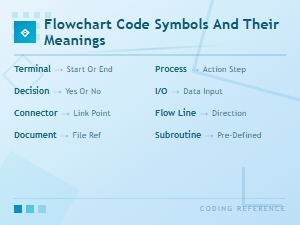
If you're new to the symbols themselves, our breakdown of flowchart code symbols and their meanings covers each one in detail.
Why do businesses use flowchart codes instead of just writing out processes?
Text-based process documents have a ceiling. Once a workflow has more than five or six steps with branching outcomes, most people lose track. Flowchart codes fix this because:
- Visual processing is faster. Research from the 3M corporation and subsequent studies suggests humans process visual information thousands of times faster than text.
- Ambiguity drops. When everyone uses the same symbol for a decision point, there's no debate about what "review the application" means in context.
- Handoffs become obvious. Swimlane diagrams using flowchart codes clearly show which department owns which step.
- Training gets easier. New hires can follow a visual map faster than reading a 12-page SOP document.
Which flowchart symbols matter most for business process mapping?
You don't need every symbol in the standard. For most business processes, these are the ones you'll use repeatedly:
- Terminator (rounded rectangle) marks the start or end of a process. Every business flowchart needs clear entry and exit points.
- Process step (rectangle) the workhorse of your diagram. Each action or task goes here.
- Decision (diamond) a yes/no or true/false branch. "Is the order over $500?" sends you down different paths.
- Document (rectangle with a wavy bottom) represents a physical or digital document being created or referenced.
- Arrow / flow line shows the sequence and direction of the process.
- Connector (small circle) used when your flow spans multiple pages or needs to jump between sections.
- Data (parallelogram) indicates input or output data, useful when mapping processes that involve systems.
Understanding how these symbols interact within larger systems particularly when mapping database-driven workflows gets covered in our guide to flowchart codes for database architecture.
How do you actually map a business process using flowchart codes?
Here's a straightforward approach that works whether you're mapping a hiring process, a returns workflow, or an approval chain:
- Define the boundaries. What triggers the process? What counts as "done"? Write these down before you open any diagramming tool.
- List every step in order. Interview the people who do the work, not just the managers. Walk through a real example from start to finish.
- Identify decision points. Where does the process branch? These become diamonds in your diagram.
- Assign ownership. If multiple teams are involved, use swimlanes to show who does what.
- Draw the flow using standard codes. Apply the correct symbols. Don't improvise shapes it defeats the purpose of using a standard.
- Validate with the team. Walk through the diagram with the people who execute the process. They'll catch gaps you missed.
A practical example: mapping an expense approval process
Imagine an employee submits an expense report. The flowchart would look like this using standard codes:
- Terminator: "Employee submits expense report"
- Process: "Manager reviews report"
- Diamond: "Is the amount under $200?"
- If yes → Process: "Auto-approve and process reimbursement"
- If no → Process: "Finance team reviews documentation"
- Diamond: "Is documentation complete?"
- If no → Process: "Return to employee for revision" (arrow loops back)
- If yes → Process: "Finance approves and processes payment"
- Terminator: "Reimbursement complete"
This simple diagram makes exceptions, escalations, and bottlenecks visible immediately. The finance review step only triggers when needed, which is exactly the kind of logic that gets lost in text descriptions.
What are the most common mistakes when using flowchart codes for process mapping?
Teams run into predictable problems. Here's what to watch for:
- Using inconsistent symbols. If one person draws decisions as ovals and another uses diamonds, the diagram becomes unreadable. Agree on the symbol set before you start.
- Too much detail too early. Start with a high-level map (5–15 steps). Then create detailed sub-processes for complex sections. Don't try to fit 60 steps into one diagram.
- Missing decision branches. Every diamond should have exactly two exit paths labeled clearly (yes/no, approved/rejected, etc.). Unlabeled arrows are a common failure point.
- No start or end point. A flowchart without terminators leaves readers guessing where the process begins and ends.
- Ignoring exception paths. The "happy path" is easy to map. The real value comes from showing what happens when things go wrong a rejected application, a missing document, a system error.
- Mapping the ideal process instead of the real one. If the actual workflow has three extra approval steps that people skip, map what really happens first. Then create a separate "future state" diagram for improvement.
Does your team need a standard for how you create flowcharts?
Yes, especially if more than one person is building diagrams. Without shared conventions, you end up with a collection of flowcharts that look and feel different from each other. This makes cross-team collaboration harder and defeats the purpose of visual documentation.
Establish rules for symbol usage, naming conventions, level of detail, and file storage. If your team works in sprints, our article on flowchart coding standards for agile teams covers how to integrate process mapping into iterative workflows without slowing down delivery.
What tools work best for business process flowcharts?
You have plenty of options, and the right choice depends on your team's needs:
- Draw.io (diagrams.net) Free, browser-based, exports to multiple formats. Good for teams that need something quick without a subscription.
- Microsoft Visio Industry standard for enterprise environments. Strong template library and integration with Microsoft 365.
- Lucidchart Cloud-based, real-time collaboration, good for distributed teams.
- Miro Works well for workshops and brainstorming sessions where you need to map processes collaboratively in real time.
- BPMN tools (Bizagi, Camunda) If you need executable process models that connect to automation platforms, BPMN-specific tools go beyond basic flowchart codes.
Whatever tool you pick, make sure it supports standard symbol sets. Some free tools offer only basic shapes, which forces you to break convention.
How do flowchart codes relate to BPMN?
Basic flowchart codes and BPMN (Business Process Model and Notation) serve similar purposes but at different levels of complexity. Basic flowchart symbols work for internal documentation, training guides, and simple process overviews. BPMN adds richer notation for message flows, pools, lanes, event types, and gateways designed for processes that will be automated or analyzed at an enterprise level.
For most small-to-mid-size business process mapping needs, standard flowchart codes are sufficient. Move to BPMN when you need to hand off process models to a development team or automation platform.
Checklist: before you share your next process flowchart
- Does every flowchart have a clear start (terminator) and end point?
- Are all decision diamonds labeled with their conditions and both exit paths?
- Did you use standard symbols consistently throughout?
- Is the level of detail appropriate for the audience (executive summary vs. operator-level)?
- Have the people who actually perform the work reviewed and confirmed the accuracy?
- Are swimlanes or ownership labels included when multiple teams are involved?
- Did you map the real process first, not the ideal one?
- Is the diagram stored somewhere your team can find and update it?
Start by picking one process that causes the most confusion in your team right now. Map it this week using the steps above. Share it with two people who do the work. Their feedback will teach you more about flowchart codes than any guide and you'll have a usable document by Friday.
 Flowchart Code Symbols and Their Meanings: a Complete Visual Guide
 Agile Flowchart Coding Standards for Efficient Team Collaboration
 Using Flowchart Codes for Database Architecture
 How Flowchart Codes Work in Software Engineering Explained
 Bpmn Notation Reference Sheet for Enterprise Architecture Teams
 How to Read Bpmn Event Gateway and Activity Codes in Workflow Mapping