Enterprise architecture teams spend a significant amount of time translating business processes into visual models that stakeholders can actually understand. When everyone on the team uses different symbols, line styles, or activity codes to represent the same workflow, communication breaks down fast. A BPMN notation reference sheet solves this problem by giving your team a single, agreed-upon source of truth for every symbol, rule, and diagramming convention used in your process models. Without one, even experienced architects end up re-explaining basic elements in every meeting.
What exactly is a BPMN notation reference sheet?
A BPMN notation reference sheet is a condensed, visual guide that lists the standard symbols defined in Business Process Model and Notation (BPMN) 2.0. It typically covers four categories of elements: flow objects (events, activities, gateways), connecting objects (sequence flows, message flows, associations), swimlanes (pools and lanes), and artifacts (data objects, groups, annotations). Think of it as a cheat sheet your team keeps within arm's reach while modeling workflows in tools like Signavio, Camunda, or Bizagi.
For enterprise architecture teams specifically, the reference sheet goes beyond a basic tutorial. It includes decisions about which BPMN elements your organization actually uses, how you label them, and what naming conventions apply. This matters because BPMN 2.0 defines dozens of symbols, but most organizations only use a subset. A well-built reference sheet reflects your team's standards, not just the full spec.
Why do enterprise architecture teams need one?
Enterprise architects model processes that cross departments, systems, and sometimes organizations. When a process diagram moves from the architecture team to a developer, a business analyst, or a compliance officer, the notation has to hold up without someone standing next to it explaining every shape. A reference sheet makes that possible.
Here are the specific situations where it pays off:
- Onboarding new team members: A new architect can start contributing to models within days instead of weeks when they have a clear notation guide tied to your organization's conventions.
- Cross-team collaboration: When the architecture team works with process owners in operations or IT, the reference sheet reduces misinterpretation of gateways, event types, and exception flows.
- Audits and governance reviews: Regulatory and internal audit teams often review process documentation. Consistent notation makes those reviews faster and less painful.
- Tool migration: If your team switches from one BPMN modeling tool to another, the reference sheet acts as a notation baseline that stays stable regardless of the software.
What should a good reference sheet include?
A useful BPMN reference sheet for enterprise architecture teams needs more than a grid of symbols with labels. It should include the following sections:
- Core element definitions: Each event type (start, end, intermediate, boundary), activity type (task, subprocess, call activity), and gateway type (exclusive, parallel, inclusive, event-based) with its symbol and a one-line explanation.
- Notation rules your team follows: For example, do you always use collapsed subprocesses, or do you expand them? Do you label every sequence flow, or only decision branches? Document these choices explicitly.
- Naming conventions: How tasks are named (verb-noun format like "Validate invoice"), how pools map to organizational units, and how message events are labeled.
- Common patterns and templates: Patterns like the exception handling block, the compensation flow, or the parallel merge that your team uses repeatedly. Having these drawn out saves time and reduces errors.
- Anti-patterns and mistakes to avoid: Elements or connections that look valid in a tool but violate BPMN semantics. This section is often the most valuable part of the reference sheet.
If you need a deeper breakdown of individual symbols, our full BPMN notation reference sheet covers each element with diagrams and naming guidance.
How do I read BPMN event, gateway, and activity codes?
This is one of the most common questions from teams adopting BPMN at scale. The difference between a timer event and a signal event, or between an exclusive gateway and an event-based gateway, changes the meaning of a process model entirely. Enterprise architects who model cross-functional workflows need to get these distinctions right because downstream teams (developers, QA, process owners) rely on the diagrams to build and test systems.
The short version: events use circles with icons inside to show what triggers or catches something, gateways use diamond shapes with internal markers to show how the flow splits or merges, and activities use rounded rectangles with markers to show task types. The details matter more than most people expect. Our guide on how to read BPMN event, gateway, and activity codes breaks this down with visual examples.
What mistakes do enterprise architecture teams make with BPMN notation?
After working with enterprise architecture teams across several industries, certain mistakes come up repeatedly:
- Overcomplicating diagrams: Using every BPMN element available instead of choosing the simplest notation that conveys the process accurately. A subprocess with a "+" marker is often better than a single diagram with 60 tasks.
- Mixing abstraction levels: Putting high-level strategic process steps on the same diagram as detailed system-level task sequences. Enterprise architecture frameworks like TOGAF already separate these layers, and your BPMN models should too.
- Inconsistent gateway logic: Using an inclusive gateway for splitting but an exclusive gateway for merging the same branch, which creates ambiguous execution semantics.
- Ignoring message flows: Many teams only use sequence flows and forget that interactions between pools require message flows. This is a core BPMN rule, and violating it makes collaboration diagrams unreadable.
- No version control on the notation standard itself: The reference sheet should have a version number and a changelog. Notation standards evolve as your team matures, and everyone needs to know which version they should follow.
For teams building cross-organizational diagrams, these collaboration diagram best practices address many of the modeling pitfalls that affect multi-pool diagrams.
How do I build a BPMN reference sheet that my team will actually use?
Most reference sheets fail because they are either too thin (just a symbol grid) or too long (a 40-page PDF nobody reads). Here is a practical approach:
- Start with the elements your team uses today. Export your last 20 process models and count which BPMN elements appear. Focus the reference sheet on those first. You can add less common elements later.
- Use real examples from your own models. Generic BPMN examples are helpful for learning, but your reference sheet should show how your team uses exclusive gateways with your naming convention. This makes it immediately practical.
- Keep it to 2–4 pages. One page for flow objects and connecting objects, one page for swimlanes and artifacts, one page for naming conventions and common patterns, and optionally one page for anti-patterns.
- Make it available where people work. A PDF in a shared drive is fine. A pinned Confluence page is better. A printable version posted near the modeling workstations is even better for co-located teams.
- Review and update it quarterly. Assign ownership to one person on the architecture team. When someone discovers a notation ambiguity or proposes a new convention, that person updates the sheet and communicates the change.
Which BPMN elements should enterprise architecture teams prioritize?
Not all BPMN elements carry the same weight in enterprise architecture work. Based on common usage patterns in EA teams, here is a prioritized list:
- Must include: Start/end events, none intermediate events, timer events, message events, user/service/script tasks, subprocesses, exclusive and parallel gateways, sequence flows, message flows, pools, lanes, and data objects.
- Should include: Signal events, error events, boundary events (interrupting and non-interrupting), inclusive gateways, event-based gateways, compensation tasks, and annotations.
- Nice to have: Complex gateways, choreography tasks, conversation diagrams, and multi-instance markers. These are useful for specific modeling scenarios but rarely appear in day-to-day EA work.
This prioritization reflects what enterprise architecture teams actually use when mapping business capabilities, application interactions, and operational processes. If your team models compliance workflows or exception-heavy processes, move error and escalation events up to the "must include" tier.
Quick-reference checklist before you share your next process model
- Every event has a clear type (none, timer, message, signal, error) and is not a generic blank circle.
- Gateway splits have matching merge gateways of the same type.
- Pool names map to real organizational units or systems.
- Lane names follow your team's naming convention.
- Message flows connect pools, never sequence flows crossing pool boundaries.
- Task names follow verb-noun format ("Submit report," not "Report submission").
- Diagram abstraction level is consistent (no mixing strategic and task-level steps).
- The model matches the current version of your team's BPMN reference sheet.
Next step: Pull your three most recent process models and audit them against this checklist. Any notation inconsistencies you find will tell you exactly which sections of your reference sheet need reinforcement or clarification. Fix those gaps now, before the next project cycle starts and the same mistakes repeat.
 How to Read Bpmn Event Gateway and Activity Codes in Workflow Mapping
 Bpmn 2.0 Collaboration Diagram Best Practices for Business Analysts
 Bpmn Process Diagram Examples for Software Developers
 Bpmn Notation Symbols: Complete Guide to Meanings and Usage
 Flowchart Codes for Business Process Mapping: a Complete Guide
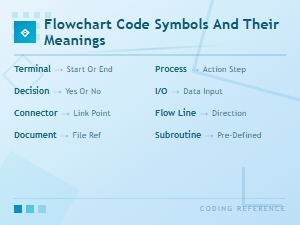 Flowchart Code Symbols and Their Meanings: a Complete Visual Guide