If you've ever tried to explain a piece of logic to a teammate using only words, you know how quickly things get confusing. Flowchart codes solve that problem. They give developers, designers, and project leads a shared visual language for mapping out how software should behave step by step, decision by decision. Understanding how flowchart codes work in software engineering helps you plan better, debug faster, and communicate more clearly with anyone on your team.
What exactly are flowchart codes in software engineering?
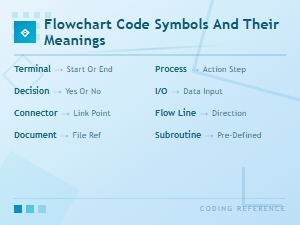
Flowchart codes are standardized visual symbols and notations used to represent the logic, sequence, and decision points within a software process. Think of them as a blueprint for your code. Instead of jumping straight into writing functions and classes, you map out what the software needs to do using shapes like rectangles (for processes), diamonds (for decisions), and arrows (for flow direction).
Each symbol carries a specific meaning. A parallelogram, for instance, typically represents input or output. An oval marks the start or end of a process. These conventions are part of what makes flowcharts useful anyone who knows the flowchart code symbols and their meanings can read and understand the diagram without additional explanation.
Why do software engineers actually use flowchart codes?
Flowchart codes aren't just academic exercises. Real engineering teams rely on them for several practical reasons:
- Planning before coding. Writing out a flowchart forces you to think through the logic before you commit to a single line of code. This catches problems early.
- Debugging existing systems. When something breaks, a flowchart of the intended behavior helps you compare what should happen against what is happening.
- Team communication. A flowchart bridges the gap between technical and non-technical stakeholders. A product manager can follow a flowchart; they probably won't enjoy reading raw pseudocode.
- Documenting complex logic. Conditional branching, loops, and exception handling become much easier to trace visually than by reading nested if-else blocks in source code.
How does the process of creating flowchart codes actually work?
Step 1: Identify the process or function you want to map
Start with a specific piece of logic. Don't try to flowchart an entire application at once. Pick one feature, one user flow, or one algorithm. For example, a login authentication process or a payment checkout flow.
Step 2: Define the start and end points
Every flowchart begins with a start terminal (an oval or rounded rectangle) and ends with an end terminal. This sounds basic, but skipping it is a surprisingly common mistake that makes flowcharts ambiguous.
Step 3: Map out each step in sequence
Use rectangles for process steps and arrows to show the order of execution. At each step, ask: "What happens next?" If there's only one answer, draw an arrow to the next step. If there are multiple possible outcomes, you need a decision symbol.
Step 4: Add decision points
Diamonds represent decisions points where the flow branches based on a condition. Label each branch clearly (yes/no, true/false, or a specific value). This is where flowchart codes get especially useful for engineering work, because forcing yourself to write out every decision branch reveals logic gaps you might miss in pseudocode.
Step 5: Connect the flow and check for completeness
Make sure every path leads somewhere either to another process step, back to a loop, or to an end point. Dangling arrows with no destination are a red flag that your logic is incomplete.
For software systems that involve data storage and retrieval, flowchart codes for database architecture follow the same core process but add symbols specific to data flows, queries, and storage operations.
What does a real-world flowchart code example look like?
Consider a simple e-commerce feature: applying a discount code at checkout.
- Start User enters a discount code.
- Process System validates the code against the database.
- Decision Is the code valid?
- No → Display an error message → End.
- Yes → Continue.
- Decision Is the code expired?
- Yes → Display "Code expired" message → End.
- No → Continue.
- Process Calculate the discount and apply it to the total.
- Process Update the order summary.
- End Proceed to payment.
This flowchart takes maybe five minutes to sketch out. But it surfaces two important questions a developer might otherwise forget: What happens when the code is invalid? What happens when the code is expired? These edge cases are much easier to catch in a visual flow than in a code review.
What are the most common mistakes when working with flowchart codes?
- Overcomplicating the chart. If your flowchart has 50+ symbols for a single feature, break it into smaller sub-flows. Nobody will follow a wall-sized diagram.
- Skipping decision branches. Only mapping the "happy path" where everything works correctly ignores the bugs your users will actually hit.
- Using inconsistent symbols. Mixing up process rectangles and input/output parallelograms confuses readers. Stick to standard flowchart code symbols.
- Not updating flowcharts after code changes. An outdated flowchart is worse than no flowchart because it gives false confidence about how the system works.
- Writing too much text inside symbols. Keep labels short. A decision diamond should say "Code valid?" not "Check whether the discount code entered by the user matches any active code in our promotions database table."
How do flowchart codes connect to actual programming code?
A flowchart isn't meant to replace your code it's a planning and communication layer that sits above it. Each rectangle in your flowchart roughly maps to a function, method, or block of code. Each diamond maps to a conditional statement (if/else, switch/case). Each arrow represents control flow.
Some teams go a step further and use flowchart-based tools that can generate pseudocode or even real code directly from the diagram. Others keep it simpler: sketch the flowchart on a whiteboard or in a tool like draw.io, then use it as a reference while writing code.
The key connection point is that every path through the flowchart should have a corresponding code path. If your flowchart shows three possible outcomes but your code only handles two, you've found a bug before your users do.
What tools do engineers use to create flowchart codes?
- Draw.io (diagrams.net) Free, browser-based, integrates with Google Drive and GitHub. Good for most engineering teams.
- Lucidchart Paid tool with strong collaboration features and templates for software-specific flowcharts.
- Mermaid.js A JavaScript library that renders flowcharts from text-based syntax. Popular in documentation because it lives inside Markdown files.
- Paper and whiteboards Still the fastest way to rough out a flowchart before committing to a digital version.
According to a Lucidchart resource on flowcharts, teams that use visual planning tools report fewer miscommunications during development sprints.
How can you get better at using flowchart codes in your engineering work?
- Practice with real features. Pick a function you wrote recently and flowchart it after the fact. You'll quickly see where the visual representation helps you understand your own logic better.
- Start simple. Begin with linear processes before tackling loops, nested conditions, and error handling.
- Get a second pair of eyes. Ask a teammate to read your flowchart and describe what the software does. If they can't follow it, simplify it.
- Keep flowcharts close to your code. Store them in the same repository or documentation folder. If they're buried in someone's personal drive, nobody will update them.
Quick checklist: Creating a flowchart code for any software feature
- Define the single process or feature you're mapping.
- Write a start terminal and an end terminal.
- List every step between start and end as process rectangles.
- Identify every decision point and add diamond shapes with clear labels.
- Make sure every branch leads to either another step or an end point.
- Review the flowchart against your planned code every path should have a matching code path.
- Share it with at least one teammate before you start coding.
- Update the flowchart whenever the logic changes.
Next step: Take a feature you're currently building, grab a piece of paper, and spend ten minutes flowcharting the core logic. You don't need perfect symbols you need clear thinking. Once you've sketched it, compare it to your actual code and see what you missed.
 Flowchart Codes for Business Process Mapping: a Complete Guide
 Flowchart Code Symbols and Their Meanings: a Complete Visual Guide
 Agile Flowchart Coding Standards for Efficient Team Collaboration
 Using Flowchart Codes for Database Architecture
 Bpmn Notation Reference Sheet for Enterprise Architecture Teams
 How to Read Bpmn Event Gateway and Activity Codes in Workflow Mapping